Your tongue is faster than your fingers.
Hold a key. Speak. Release. Your words appear like magic. Powered by Whisper AI running entirely on your Mac. No cloud. No accounts. No subscriptions.
macOS 14+ · Apple Silicon · Free forever, Pro if you want

What it does (really well)
Talk instead of typing
Typing is so 2025. Hold your hotkey, say what you mean, let go. TongueType transcribes your speech faster than your fingers could ever dream of moving. Perfect for emails, Slack messages, code comments, and those LLM prompts that somehow became your whole job.
Transcribe any file
Got a meeting recording? An interview? That voice memo you swore you’d listen to later? Drag in WAV, MP3, MP4, or MOV. TongueType eats them all and spits out text. Locally, obviously.
What happens on your Mac stays on your Mac
No cloud. No servers. No analytics. No “anonymous usage data.” Your audio never leaves your device. We literally can’t spy on you even if we wanted to. Which we don’t.
Three steps. No manual required.
Hold your hotkey
Right Option key by default, but you do you.
Speak
In any of 12 languages. TongueType even auto-detects which one.
Release
Text appears wherever your cursor is, matched to the capitalization and spacing around it. Like you typed it. But you didn’t.
Tune it to taste

Hold, speak, release
A small overlay appears the moment you press your hotkey, showing a live waveform and an elapsed timer so you know it’s listening. Release the key and your words land wherever your cursor is — no window to switch to, no button to click.
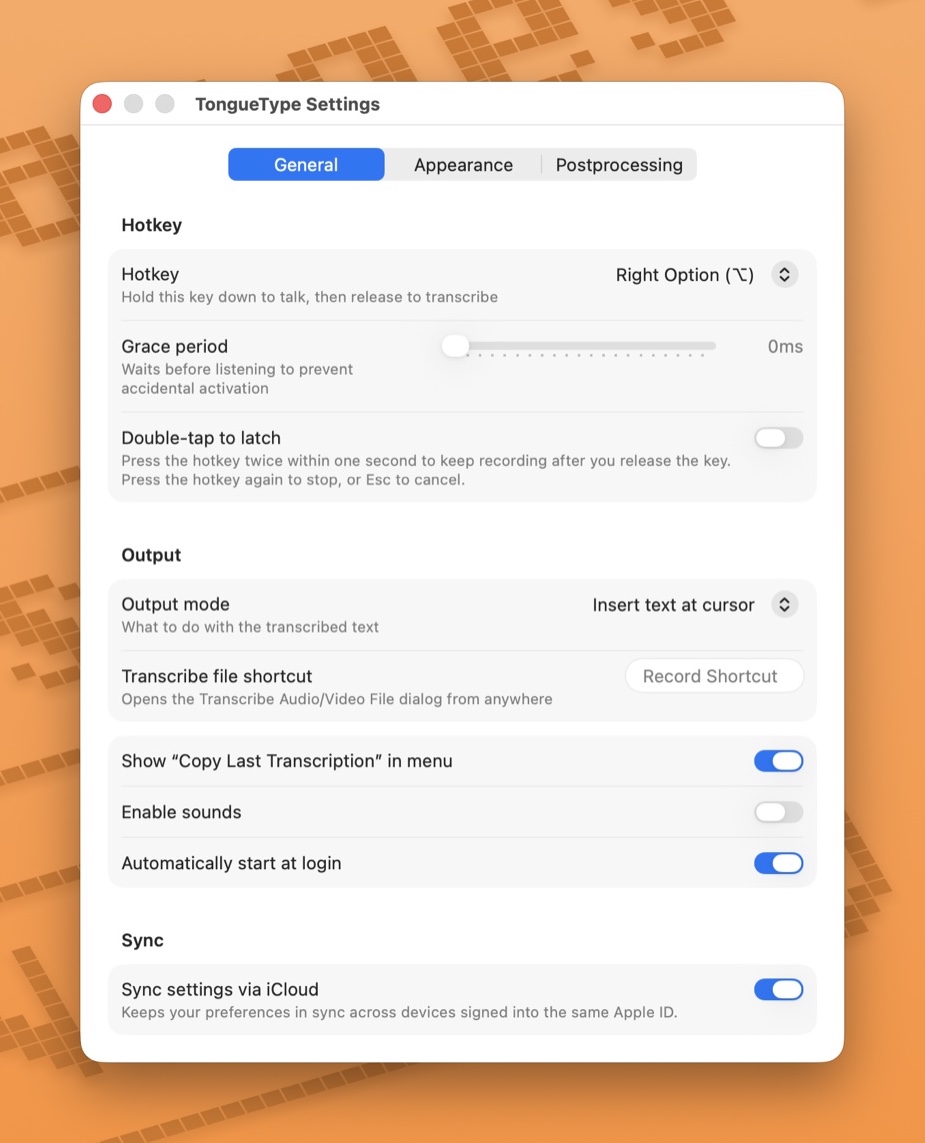
Set it up your way
Pick your hotkey, dial in a grace period to avoid accidental activation, and turn on double-tap to latch for longer takes. Choose how transcribed text gets inserted, sync your preferences across Macs via iCloud, and decide what happens at launch.
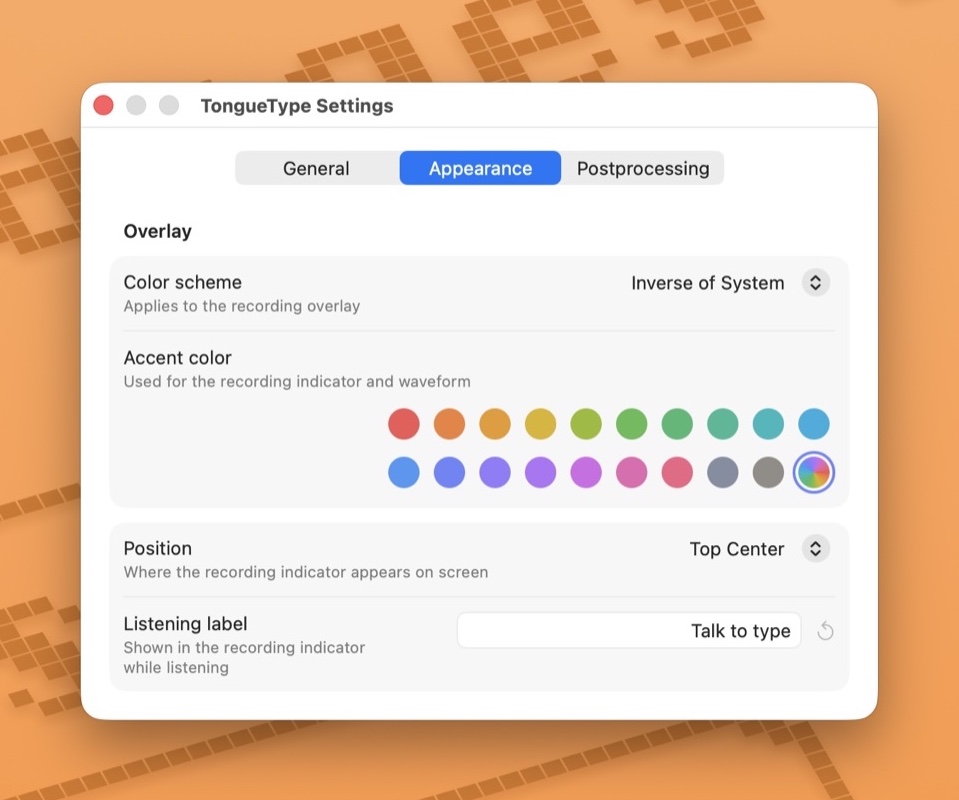
Change the look
Match the overlay to your system theme or flip it. Pick from twenty accent colors, or turn on Rainbow Mode and six more color themes for a spinning gradient. Place the recording indicator in any of seven anchor points, and write your own listening label.
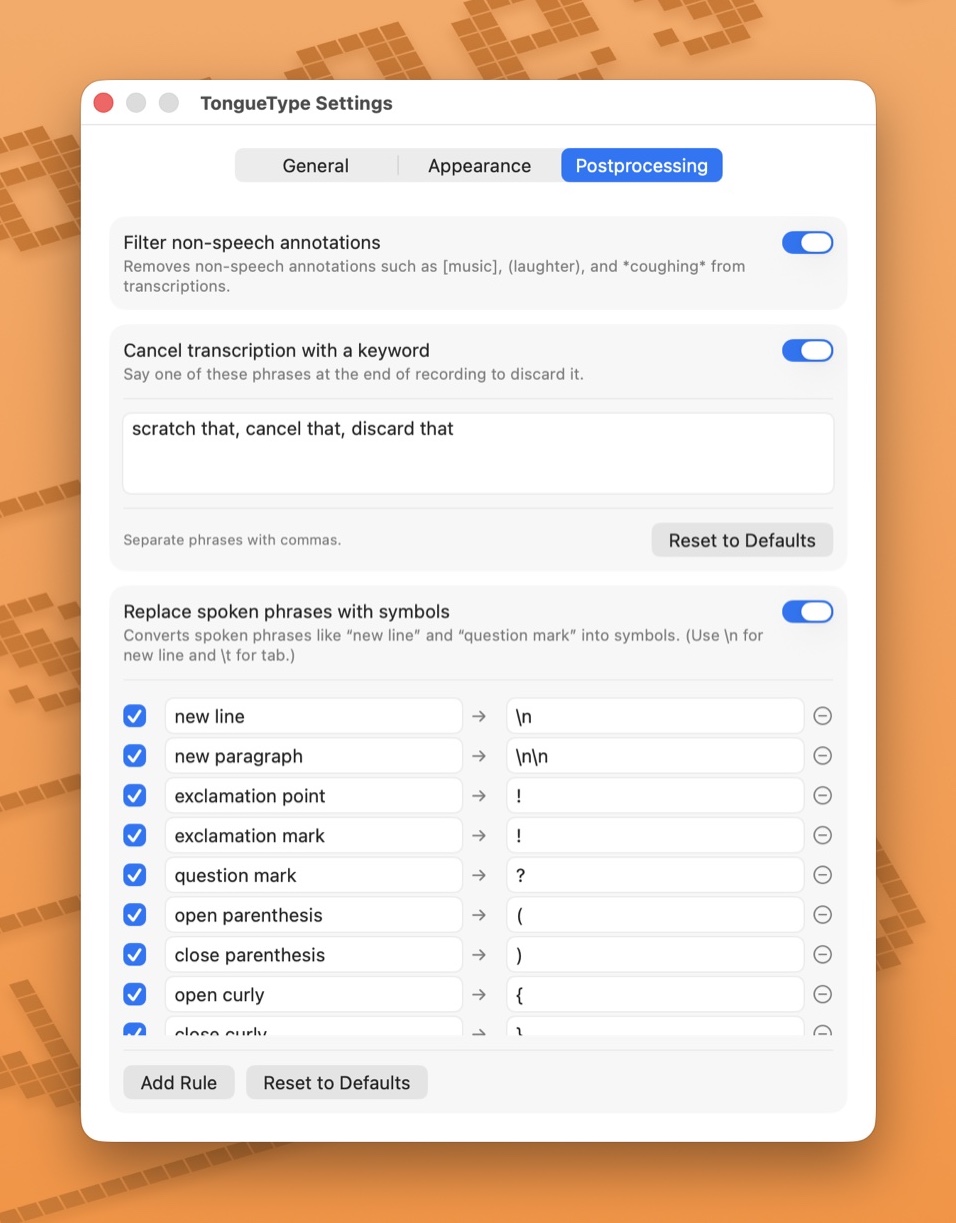
Clean up the output
Strip non-speech annotations like [music] and (laughter) from your transcripts. Cancel a take mid-recording with a single spoken phrase like “scratch that” or “cancel that.” Map spoken cues like “new line” or “question mark” to symbols you’d rather not spell aloud.
Pay once. Or never.
- 30 minutes of live dictation per month
- File transcription, capped at the first 10 seconds of each file
- Hold-to-record hotkey, plus double-tap to latch for hands-free dictation
- Transcribe WAV, MP3, MP4, and MOV files
- 12 languages with automatic detection
- Whisper AI runs entirely on your Mac. No cloud, no account, no analytics
- Insert text right where your cursor is, or copy it to the clipboard
- Postprocessing rules: replacements, cancel phrases, annotation filtering
- Your choice of hotkey, overlay position, and listening label
- 20 accent colors, six color themes, and Rainbow Mode
- Microphone picker and sounds (or silence)
- iCloud settings sync between your Macs
- Launch at login
- Everything in Free
- Unlimited live dictation, no monthly meter
- Full-length file transcription, no 10-second cap
- One-time purchase, no subscription
- One license key works on up to 5 Macs
- 30-day refund if it isn’t working out
- Support a small, independent developer
“I used up the free 30 minutes in my first week. Paying once for unlimited dictation was an easy call, and not adding another subscription was the deciding factor.”
“I bought Pro to transcribe full-length interview recordings. It has handled 90-minute files without a problem, and the transcripts are accurate enough that I edit instead of retype.”
Why TongueType?
No subscription
Pay once for Pro or stick with free. The free version includes every feature, with 30 minutes of live dictation per month. Need more? Pro is $19.99 one-time, good on up to 5 Macs.
100% private
Runs Whisper AI locally on Apple Silicon. Your words stay on your Mac. We don’t even have a server to send them to.
12 languages
English, Spanish, French, German, Japanese, Chinese, Korean, and more, plus auto‑detection for the polyglots.
An alternate way to type
If using a keyboard is painful, slow, or impossible, TongueType is an input method built around your voice. Hold the hotkey, speak, and the text lands in your app.
Make it yours
Choose your hotkey, overlay position, and a listening label in your own words. Twenty accent colors tint the recording dot and waveform, plus Rainbow Mode and six more color themes for a gradient of colors while you type. Sign into iCloud and every one of those choices follows you to your other Macs.
Rainbow
What people are saying
“I write prompts and specs all day, and dictating them is noticeably faster than typing. The accuracy is good enough that I rarely have to go back and fix anything.”
“I transcribed a two-hour meeting recording in a few minutes. Having a searchable transcript to share with the team has changed how we run retros.”
“Everything runs on the Mac itself. No account, no cloud processing, no telemetry. It’s the first dictation tool I’ve been comfortable using for work email.”
“It handles technical vocabulary well. Kubernetes, Terraform, and our internal service names come through correctly, which built-in dictation never managed for me.”
Questions you probably have
Is TongueType really free?
Yes. TongueType is free with every feature included. The free tier covers 30 minutes of live dictation per calendar month, and file transcription is capped at the first 10 seconds of each file so you can try it before deciding. If you want unlimited dictation and full-length files, TongueType Pro is $19.99 one-time, good on up to 5 Macs. No subscriptions, no recurring charges, no surprise renewal emails.
I can’t find TongueType after installing it. Where is it?
TongueType is a menu bar app, so it has no Dock icon and no main window. Look for its icon in the menu bar at the top-right of your screen, near the clock.
If you don’t see it, your menu bar is probably full: on MacBooks the icon can hide behind the notch, or it overflows off-screen behind the frontmost app’s menus. Make that app’s window narrower, or quit a few other menu bar apps, and the TongueType icon should reappear.
Using a menu bar manager like Bartender, Ice, or Hidden Bar? TongueType may be tucked into its hidden section. Check there and drag the icon into the always-visible area. Either way, you can press the dictation hotkey (Right Option by default) to confirm TongueType is running even when the icon isn’t visible.
How do I purchase TongueType Pro?
Click Unlock Pro… in the menu bar, then Buy a license. Checkout opens on Polar, our payment provider, and your license key arrives by email within a minute or two. Paste it back into the Unlock Pro… window and both limits lift immediately — no relaunch needed.
It’s $19.99 one-time, good on up to 5 Macs. The Pro docs page has the full details on activating and moving your license.
How do I restore my purchase on a new Mac or after reinstalling?
Your license key is your purchase. Open Unlock Pro… in the menu bar and paste the same key you received by email when you bought it. Both limits lift right away.
One license covers up to 5 Macs. If you’ve used every slot, open Unlock Pro… on a Mac you no longer use and click Deactivate this device to free one up. Lost your key? Look it up anytime in your Polar customer portal (sign in with the email you used at checkout), or click Lost your key? in that same window.
Does my audio get sent anywhere?
No. TongueType uses Whisper AI running locally on your Mac’s Apple Silicon. Your audio is processed entirely on-device. We don’t have servers. We don’t have analytics. We don’t even have your email address.
Does TongueType work offline?
Yes. After the one-time model download during setup, transcription runs entirely on your Mac with no internet connection required. Planes, trains, and dead-zone coffee shops are all fair game: if your Mac is on, dictation works.
Why does it require Apple Silicon?
TongueType runs the Whisper AI model on Apple’s Neural Engine via CoreML. This requires an M1 chip or later. Intel Macs aren’t supported. Sorry, your 2019 MacBook Pro had a good run.
How is this different from macOS built-in dictation?
In our experience, built-in dictation simply isn’t as accurate, and it’s far less flexible: TongueType gives you a configurable hold-to-record hotkey, audio and video file transcription, smart insertion that matches the text around your cursor, and smart post-processing with your own custom rules. For long-form or professional dictation, that combination matters a lot more than a built-in shortcut does.
It’s also just more fun. Pick from twenty accent colors, or turn on Rainbow Mode or one of six other color themes for the recording overlay, write your own listening label, place the recording indicator wherever you like, and sync it all across your Macs.
How accurate are the transcriptions?
TongueType uses OpenAI’s Whisper model, which holds up well even with accents, background noise, and the occasional mumble. It’s not perfect (no speech-to-text is), but it’s accurate enough that you’ll spend less time fixing transcriptions than you would have spent typing in the first place.
What languages does it support?
English, Spanish, French, German, Portuguese, Italian, Japanese, Chinese, Korean, Dutch, and Russian. Plus auto-detection if you like to keep TongueType guessing. The multilingual dictation page covers switching, auto-detect, and spoken punctuation in other languages.
Can I use it for coding?
Absolutely. It works anywhere your cursor can type. Code comments, commit messages, documentation, Slack rants about why the build is broken. All fair game. The Dictation for coding & AI prompts page has more on where TongueType shines in developer tools and AI chat apps.
Is TongueType useful for people who have difficulty typing?
Yes. TongueType is built to work as an alternate input method for users whose hands don’t cooperate with a keyboard. Common reasons include arthritis, carpal tunnel, tendonitis or RSI, tremor, hemiparesis after a stroke, and limb difference. Hold the hotkey, speak, release. The transcription goes into your app the same way typed text would. The Accessibility page covers the conditions it can help with and the setup choices that make it more comfortable.
Can I use TongueType on more than one Mac?
Yes. Turn on Sync settings via iCloud under Settings → General and your preferences — hotkey, output mode, appearance, language, postprocessing rules, and more — follow you between any Macs signed into the same Apple ID. The first time you enable it, TongueType asks whether to use the settings already in iCloud or replace them with this Mac’s. A few things stay per-Mac on purpose, like your microphone choice and permission grants. TongueType itself is a free download you can install on as many Macs as you like, and a single Pro license activates on up to 5 Macs. The iCloud sync docs have the details.
Is TongueType available for iOS?
Not yet. We tried, hard. Unfortunately, iOS doesn’t allow keyboard extensions to access the microphone, which means any voice-typing keyboard on iOS has to bounce you out to a separate app to record, then bounce you back. The result is clunky and slow, and we’d rather ship nothing than ship that.
We’re keeping a close eye on iOS and will ship an iPhone version the moment Apple gives keyboard extensions proper microphone access. Until then, TongueType is macOS only.
How TongueType compares
Weighing your options? These pages compare TongueType with other Mac dictation tools, including where the other app is the better pick.
- TongueType vs Wispr Flow · on-device and one-time vs cloud and subscription
- TongueType vs Superwhisper · simpler, and a one-time price instead of a subscription
- TongueType vs MacWhisper · dictation-first vs file-transcription-first
- Dragon dictation alternative for Mac · a modern replacement since Dragon left
- Apple dictation alternative · more accuracy, more flexibility, file transcription
- Mac dictation with no subscription · pay once, own it
Ready to let your tongue do the typing?
Download TongueType and start talking. Your fingers will thank you.
macOS 14+ · Apple Silicon · Direct download, no App Store